should i take Core Web Vitals seriously ?

javadth

Elite Member
Jr. VIP
Joined
Aug 27, 2012
Messages
3,284
Reaction score
1,219
HI
I have WordPress websites + WooCommerce.

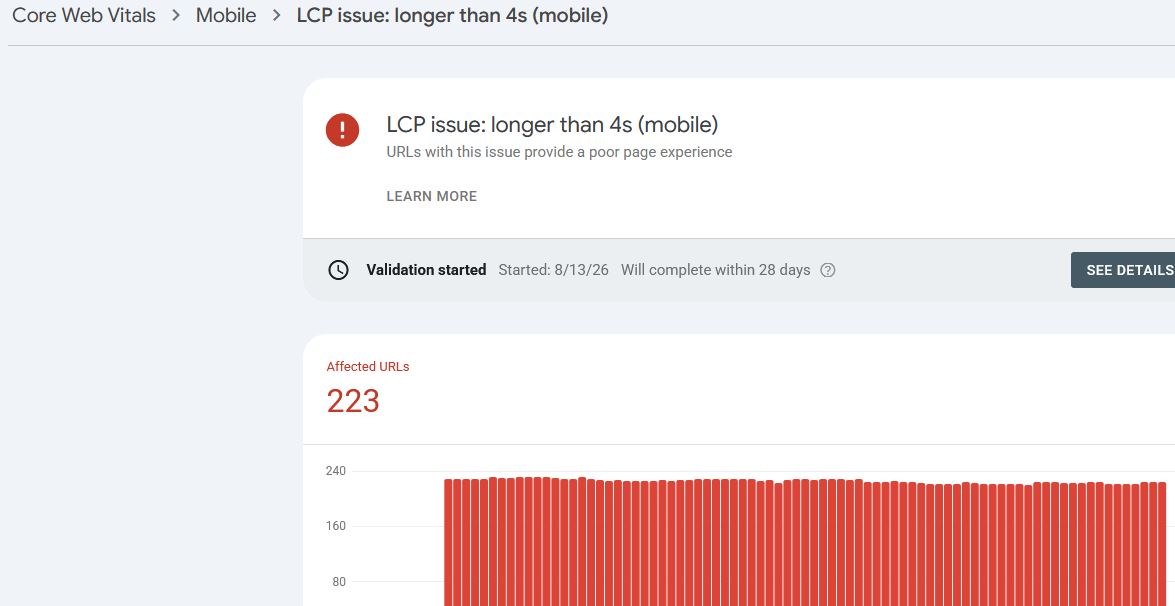
Every day I'm opening GSC and seeing new error

i have WP Fastest Cache and some other plugins to speed up my website

but I don't use AMP plugins because I'm using a WooCommerce theme. But I see these errors on my search console
should i take it seriously or not ? how to solve it ?
5a4d564ad5.JPG
 
HI
I have WordPress websites + WooCommerce.

Every day I'm opening GSC and seeing new error

i have WP Fastest Cache and some other plugins to speed up my website

but I don't use AMP plugins because I'm using a WooCommerce theme. But I see these errors on my search console
should i take it seriously or not ? how to solve it ?

View attachment 540849
obviously, take CWV seriously, but do not be obsessive about every GSC warning you receive. If you have woocommerce, then first optimize LCP/INP/CLS for real users.
 
how much does it important ?? my sites really loads very fast in my country but still google shows 200 poor pages. I don't know what should i do
 
Yes, it’s worth fixing. WooCommerce pages often share the same theme, scripts, and images. Your site can feel fast locally while Google’s real-user data shows slower results on other devices/networks. I’d check 2–3 affected URLs in PageSpeed Insights and look at LCP, TTFB, and the LCP element. That will usually reveal the actual issue.

And no, you don’t need AMP just because of this.
 
I wouldn’t worry about every error in GSC tbh. I’ve had stuff showing there even when the site was working fine. I’d check the actual CWV numbers first and see if anything is really failing before changing a bunch of things.
 
HI
I have WordPress websites + WooCommerce.

Every day I'm opening GSC and seeing new error

i have WP Fastest Cache and some other plugins to speed up my website

but I don't use AMP plugins because I'm using a WooCommerce theme. But I see these errors on my search console
should i take it seriously or not ? how to solve it ?

View attachment 540849
Do you have a large image in the hero section? Or are you loading some kind of analytics script in the head section of the site? That seems to be the reason, and yup, you should take it seriously. I don't know about ranking, but your site will feel sluggish to a real user, that is for sure. Having a cache does nothing when it comes to loading a large image you have in the first fold, or a script that takes time to load. It still has to load for the user.

Perhaps try hiring someone from the Hire a Freelancer section and tell them to fix the LCP issue (use the lighthouse score built into chrome devtools to compare before and after).
 
Do you have a large image in the hero section? Or are you loading some kind of analytics script in the head section of the site? That seems to be the reason, and yup, you should take it seriously. I don't know about ranking, but your site will feel sluggish to a real user, that is for sure. Having a cache does nothing when it comes to loading a large image you have in the first fold, or a script that takes time to load. It still has to load for the user.

Perhaps try hiring someone from the Hire a Freelancer section and tell them to fix the LCP issue (use the lighthouse score built into chrome devtools to compare before and after).
no analytic scripts
header image is just 53 kb
disabled google fonts switched to old fonts like tahoma
using hetpack and WordPress fastest cache at same time
and just it
it takes only 2 seconds to load
but still gives me error


the website that is higher than me in ranking tajes 4 5 seconds to load but it is green in cwv
 
no analytic scripts
header image is just 53 kb
disabled google fonts switched to old fonts like tahoma
using hetpack and WordPress fastest cache at same time
and just it
it takes only 2 seconds to load
but still gives me error


the website that is higher than me in ranking tajes 4 5 seconds to load but it is green in cwv
I am not sure about your competition, but try running the lighthouse test and see what is taking the most time. It could be that the server is a bit on the low end and it is having trouble serving the files to some users (could be the traffic load/cpu throttling too). If you have an easy way to switch to a different server, may be try that. If the site is important enough, I would personally try to fix the issue instead of ignoring it.
 
no analytic scripts
header image is just 53 kb
disabled google fonts switched to old fonts like tahoma
using hetpack and WordPress fastest cache at same time
and just it
it takes only 2 seconds to load
but still gives me error


the website that is higher than me in ranking tajes 4 5 seconds to load but it is green in cwv
The 2 second load time doesn’t necessarily mean your CWV should be green. I’d open the GSC issue and check which metric is actually failing — LCP, INP or CLS. Your competitor can feel slower overall and still pass those metrics
 
Back
Top