Tiktok Ads - is it possible to get rid of "Promoted Products" at the ad level

StylingSteve

Newbie
Joined
Aug 8, 2024
Messages
7
Reaction score
2
I want to run ads to my website, but my at the ad level it pops up this "prompted products" section, and gives no way to add a destination URL. I have tried everything I know to get rid of this or find a work around. I even opened a brand new ad account, and it has the same issue. Anyone have any suggestions?
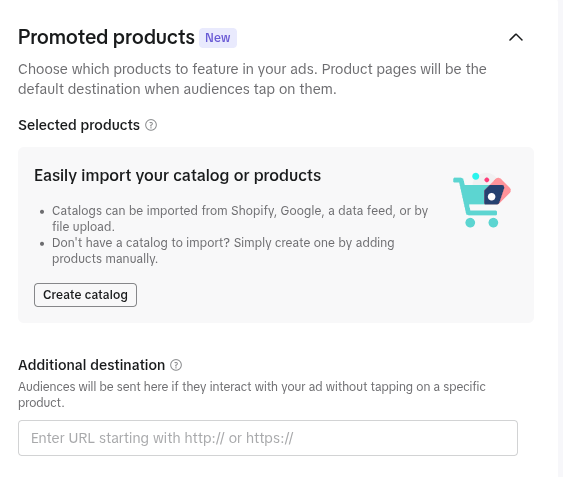
Screenshot_20260814_034434.png
 
Sadly, it is how it works and I don't think there is a way to leave that.
 
Sadly, it is how it works and I don't think there is a way to leave that.
Do you know a way to get it to go to the right destination? for me even with the catalog it does not show the product I want to run ads for.
 
to be honest i dont think there is another way around this
 
It may be tied to the campaign objective or sales/ shopping setup, try creating a standard traffic campaign and select website as the destination.
 
It may be tied to the campaign objective or sales/ shopping setup, try creating a standard traffic campaign and select website as the destination.
I've tried :( it won't go away
 
I want to run ads to my website, but my at the ad level it pops up this "prompted products" section, and gives no way to add a destination URL. I have tried everything I know to get rid of this or find a work around. I even opened a brand new ad account, and it has the same issue. Anyone have any suggestions?View attachment 540829
maybe it is the format of the ad itself rather than the account that causes this issue. promoted products typically means that the platform will consider it as product or catalog format so i would rebuild the whole campaign anew nd use traffic converrsion objective nd a non product format for that. if the URL field does not pop up then i would raise a ticket to support.
 
Come on man, you want the platforms Identity to be erased? That's TikToks way of still holding you in leash without obviously saying so. So, NO. There is no known way for now to get that off your ads. Or wait, you can hack their database, decipher the script running that nuisance. Edit and all that.
 
1786698439901.png
Why don't you just enter the URL here? You don't need to pay attention to the promoted products above.
 
I think it depends on the type of TikTok ad you are running. I have seen some ads where the promoted product cannot be removed at the ad level. I would check the ad settings first to see if TikTok gives you the option to remove it.
 
sounds like tiktok has changed the ad setup on their end. If it happens on a fresh account too ı doubt there’s a simple workaround.
 
Back
Top