

- Sep 29, 2025
- 182
- 36
Most "HTTPS proxies" on the market are not HTTPS — here's how to verify yours
Been digging into proxy protocol implementations for a project and caught something most people miss: when a provider's page says "HTTPS supported", it almost always means HTTP proxy with CONNECT tunneling, not a real HTTPS proxy where the client-to-proxy channel is itself TLS-encrypted.
The difference matters if you work through public Wi-Fi, corporate egress inspection, ISPs with DPI, or anti-detect browsers that choke on HTTP proxies.
What happens with a regular HTTP proxy
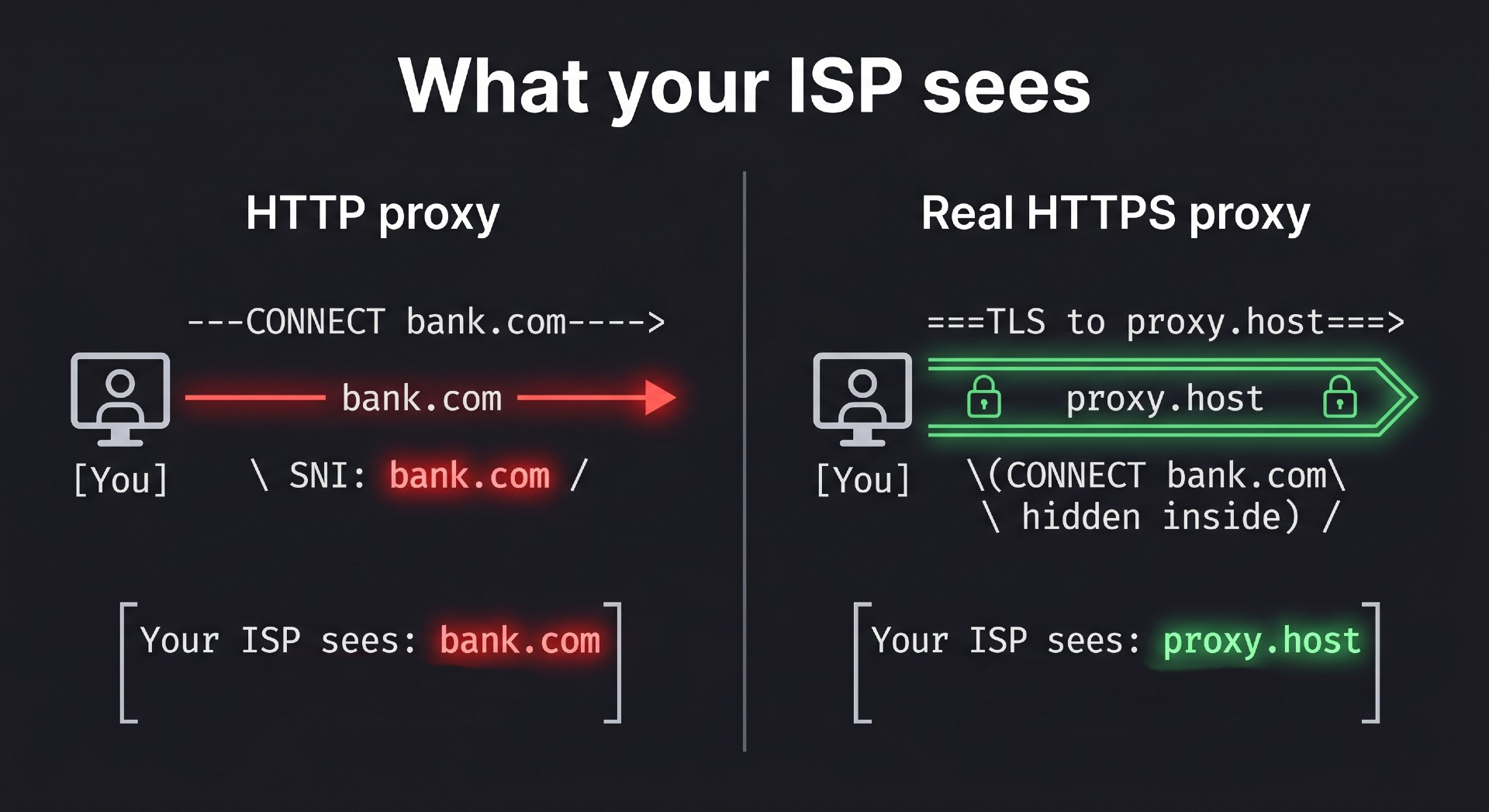
When you connect to `https://bank.com` through an HTTP proxy, your client sends:
```
CONNECT www.bank.com:443 HTTP/1.1
```
Plaintext, over unencrypted TCP.
Then the TLS ClientHello your browser sends through the tunnel contains the SNI extension with the same hostname. ClientHello is not encrypted either.
So `bank.com` leaks twice on the client-to-proxy leg, readable by anyone on that segment: your ISP, the Wi-Fi operator, a corporate DPI box, a transit carrier with DPI (Iran, Pakistan, Kazakhstan, China, partly Russia/Belarus).
What a real HTTPS proxy does
Client opens TCP to the proxy and wraps it in TLS immediately, exactly like connecting to a normal HTTPS site. Every byte after that — CONNECT command, destination handshake, everything — runs inside that encrypted tunnel.
Observer sees one TLS connection to the proxy host. Nothing else.
Verify your provider in one command
```
openssl s_client -connect proxy.host ort
ort
```
TLS handshake back = real HTTPS proxy.
Plain HTTP ("400 Bad Request" or "407 Proxy Authentication Required") = HTTP proxy, regardless of marketing.
Tool support (start of 2026)
Native: curl (`--proxy https://...`), Python httpx, Playwright, Multilogin, Dolphin Anty, GoLogin, Kameleo, AdsPower, Undetectable.
Partial: Selenium, Puppeteer.
Not supported: Chrome/Firefox GUI (only via PAC script with `HTTPS hostort` directive), Scrapy default, Python requests.
Gotcha most people hit: Chrome's `--proxy-server=https://` flag does NOT make Chrome use TLS to the proxy. It silently falls through to plain HTTP. Only PAC with the `HTTPS hostort` directive works.
Where we landed
Vendor disclosure upfront — I run Geekproxy. We set up real HTTPS proxies on all endpoints, TLS 1.3 with valid Let's Encrypt certs, no header leaks, client-to-proxy channel fully encrypted. Runs on a separate port alongside HTTP/SOCKS5/Shadowsocks on the same IPs.
If you want to stress-test it: DM me, I'll send trial credentials on any PoP. Run the openssl command first — it's the honest way to check.
Full writeup with connection examples (curl, Playwright, PAC script for Chrome/Firefox) and the protocol mechanics behind the leak: https://geekproxy.io/blog/https-proxy
Happy to answer mechanical questions in the thread. If you're testing a different vendor and want a sanity check on whether their "HTTPS" is real, post the `openssl s_client` output and I'll read it.
Been digging into proxy protocol implementations for a project and caught something most people miss: when a provider's page says "HTTPS supported", it almost always means HTTP proxy with CONNECT tunneling, not a real HTTPS proxy where the client-to-proxy channel is itself TLS-encrypted.
The difference matters if you work through public Wi-Fi, corporate egress inspection, ISPs with DPI, or anti-detect browsers that choke on HTTP proxies.
What happens with a regular HTTP proxy
When you connect to `https://bank.com` through an HTTP proxy, your client sends:
```
CONNECT www.bank.com:443 HTTP/1.1
```
Plaintext, over unencrypted TCP.
Then the TLS ClientHello your browser sends through the tunnel contains the SNI extension with the same hostname. ClientHello is not encrypted either.
So `bank.com` leaks twice on the client-to-proxy leg, readable by anyone on that segment: your ISP, the Wi-Fi operator, a corporate DPI box, a transit carrier with DPI (Iran, Pakistan, Kazakhstan, China, partly Russia/Belarus).
What a real HTTPS proxy does
Client opens TCP to the proxy and wraps it in TLS immediately, exactly like connecting to a normal HTTPS site. Every byte after that — CONNECT command, destination handshake, everything — runs inside that encrypted tunnel.
Observer sees one TLS connection to the proxy host. Nothing else.
Verify your provider in one command
```
openssl s_client -connect proxy.host
ort```
TLS handshake back = real HTTPS proxy.
Plain HTTP ("400 Bad Request" or "407 Proxy Authentication Required") = HTTP proxy, regardless of marketing.
Tool support (start of 2026)
Native: curl (`--proxy https://...`), Python httpx, Playwright, Multilogin, Dolphin Anty, GoLogin, Kameleo, AdsPower, Undetectable.
Partial: Selenium, Puppeteer.
Not supported: Chrome/Firefox GUI (only via PAC script with `HTTPS host
ort` directive), Scrapy default, Python requests.Gotcha most people hit: Chrome's `--proxy-server=https://` flag does NOT make Chrome use TLS to the proxy. It silently falls through to plain HTTP. Only PAC with the `HTTPS host
ort` directive works.Where we landed
Vendor disclosure upfront — I run Geekproxy. We set up real HTTPS proxies on all endpoints, TLS 1.3 with valid Let's Encrypt certs, no header leaks, client-to-proxy channel fully encrypted. Runs on a separate port alongside HTTP/SOCKS5/Shadowsocks on the same IPs.
If you want to stress-test it: DM me, I'll send trial credentials on any PoP. Run the openssl command first — it's the honest way to check.
Full writeup with connection examples (curl, Playwright, PAC script for Chrome/Firefox) and the protocol mechanics behind the leak: https://geekproxy.io/blog/https-proxy
Happy to answer mechanical questions in the thread. If you're testing a different vendor and want a sanity check on whether their "HTTPS" is real, post the `openssl s_client` output and I'll read it.
