

- Jan 8, 2010
- 13,669
- 7,723
Facedominator is the MOST Powerful Facebook marketing tool in the planet today, if you can master it, you will master FB in no time.
If you are a Facedominator user, you might find this guide useful.
There are Generally two ways to join groups using Facedominator :
- By Creating Campaign
- Without Creating Campaign
- By Creating Campaign-
(I)- The very first step is to save the URLs of the group (for ex- 20) that you want to join in text format. Now you need to sign in the application and click on the Group Campaign Manager option which you will get at the left side of the screen.
(II)- After clicking, now you have to click on the checkbox namely Group Request. Now proceed and load the group URLs at the Load Group URLs option. Here you can load the URLs.
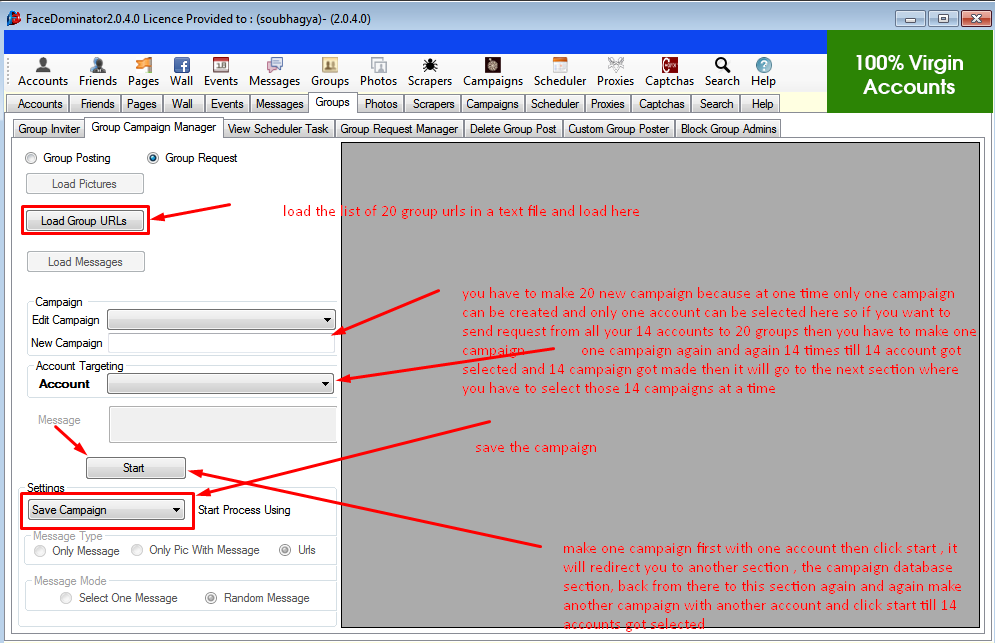
(III)- Now you need to make 20 new campaigns because at once only one campaign can be created and only one account can be selected. So in order to send a request to 20 groups from all your accounts you need to create campaign again and again until all your accounts get selected. In the next section, you need to select the all the campaigns at once. You need to click on start option and you will find that you are redirected to the database section. You need to come back from the database section to the earlier section and click on start until all your accounts get selected.
(IV)- By Clicking the Save Campaign option at the setting, you can save all your campaigns.
(V)- Now you need to go to the Group Request Manager. Here you need to click on the checkbox namely, use saved campaigns. Press Ctrl. and click on all the campaigns that you made.

(VI)- Now you need to click on another checkbox termed as Unique Request Per Group. This is done so that no group will get a request from the same account. From the Dropdown, select option "Request sending using group URL file".
(VII) Now as shown in the image, you need to select various options such as Number of Group Users per Request, No. of Groups in Batches, Interval in minutes, Delay and Start Process using. You need to select the above according to your personal demands.(VIII)- By clicking on the start option, you start sending the request to the groups.
- Without Creating Campaign-
(I)- Here you do not require to make any Campaigns. You need to click on the Groups then to Groups Request Manager Options. There you need to load the URLs as done in the above method.
(II)- Here you need to click on the Unique Request Per Group Option. In this way, a group will get a request from a unique account. No group will receive the request twice from the same account. But it will be completely random, you cannot decide whether you can send a request to a group from a specific account.

(III)- From the Dropdown, select option "Request sending using group Url file".You can also set the appropriate option like From one account you can send requests to all the groups too.
(IV)- As done in the above method, fill in the options such as Number of Group Users per Request, No. of Groups in Batches, Interval in minutes, Delay and Start Process using as per your personal demand.
(V)- By clicking on the start option, you start sending the request to the groups.
Note: In order not to get spammed, you need to send 20-25 requests in a day. You can send 100-200 per day if its an old account.
Hope you found this guide useful.
IB
If you are a Facedominator user, you might find this guide useful.
There are Generally two ways to join groups using Facedominator :
- By Creating Campaign
- Without Creating Campaign
- By Creating Campaign-
(I)- The very first step is to save the URLs of the group (for ex- 20) that you want to join in text format. Now you need to sign in the application and click on the Group Campaign Manager option which you will get at the left side of the screen.
(II)- After clicking, now you have to click on the checkbox namely Group Request. Now proceed and load the group URLs at the Load Group URLs option. Here you can load the URLs.
(III)- Now you need to make 20 new campaigns because at once only one campaign can be created and only one account can be selected. So in order to send a request to 20 groups from all your accounts you need to create campaign again and again until all your accounts get selected. In the next section, you need to select the all the campaigns at once. You need to click on start option and you will find that you are redirected to the database section. You need to come back from the database section to the earlier section and click on start until all your accounts get selected.
(IV)- By Clicking the Save Campaign option at the setting, you can save all your campaigns.
(V)- Now you need to go to the Group Request Manager. Here you need to click on the checkbox namely, use saved campaigns. Press Ctrl. and click on all the campaigns that you made.
(VI)- Now you need to click on another checkbox termed as Unique Request Per Group. This is done so that no group will get a request from the same account. From the Dropdown, select option "Request sending using group URL file".
(VII) Now as shown in the image, you need to select various options such as Number of Group Users per Request, No. of Groups in Batches, Interval in minutes, Delay and Start Process using. You need to select the above according to your personal demands.(VIII)- By clicking on the start option, you start sending the request to the groups.
- Without Creating Campaign-
(I)- Here you do not require to make any Campaigns. You need to click on the Groups then to Groups Request Manager Options. There you need to load the URLs as done in the above method.
(II)- Here you need to click on the Unique Request Per Group Option. In this way, a group will get a request from a unique account. No group will receive the request twice from the same account. But it will be completely random, you cannot decide whether you can send a request to a group from a specific account.
(III)- From the Dropdown, select option "Request sending using group Url file".You can also set the appropriate option like From one account you can send requests to all the groups too.
(IV)- As done in the above method, fill in the options such as Number of Group Users per Request, No. of Groups in Batches, Interval in minutes, Delay and Start Process using as per your personal demand.
(V)- By clicking on the start option, you start sending the request to the groups.
Note: In order not to get spammed, you need to send 20-25 requests in a day. You can send 100-200 per day if its an old account.
Hope you found this guide useful.
IB
Last edited by a moderator:


