
You are using an out of date browser. It may not display this or other websites correctly.
You should upgrade or use an alternative browser.
You should upgrade or use an alternative browser.
Facebook Page
- Thread starter Kevvin
- Start date

Caden Marketing Agency
BANNED - Failed to resolve a dispute
- Feb 26, 2024
- 1,800
- 604
Check your fb page type:
Make sure your page is set up with the correct type. For example, a business, organization or community Page often has a "Like" button, while a personal or content creator page may only have a "Follow" button.
Make sure your page is set up with the correct type. For example, a business, organization or community Page often has a "Like" button, while a personal or content creator page may only have a "Follow" button.

burkettkapkar
Newbie
- Jul 8, 2024
- 8
- 4
This is a new option, you can edit it in settings and pay attention to which category your page falls into


MonKey Agency
Registered Member
- Jul 12, 2024
- 65
- 4
You can go to settings to customize as desired

TiTi Agency
Junior Member
- Jul 14, 2024
- 137
- 11
You can go to settings to customize it to your liking

- Nov 22, 2023
- 1,830
- 445
Please check to see if the site is country-restricted or bannedI have a facebook page wich is pretty active butni noticed it doesn’t show the Like option for other people to like tha page just the Follow button anyone has dealt with it ? Thanks

NWH Marketing Agency
Junior Member
- Nov 20, 2023
- 140
- 25
Go to your site's privacy settings to edit it.


Cryus Media
BANNED
- Jun 13, 2024
- 422
- 51
Make sure you choose the right site type when setting it up. Each page type has a different display type

lagome
Junior Member
- May 16, 2022
- 167
- 49
You can refer to:
Step 1: Access the fanpage you are managing. If you do not have a Fanpage, create a new one.
Step 2: At the right corner of the page click Add button.
Step 3: Click follow.
Step 4: After creating the follow button, you will see the interface.
Step 5: Go out and check if your fanpage is as desired.
Step 1: Access the fanpage you are managing. If you do not have a Fanpage, create a new one.
Step 2: At the right corner of the page click Add button.
Step 3: Click follow.
Step 4: After creating the follow button, you will see the interface.
Step 5: Go out and check if your fanpage is as desired.

- Nov 23, 2020
- 3,102
- 814
You can check the button here
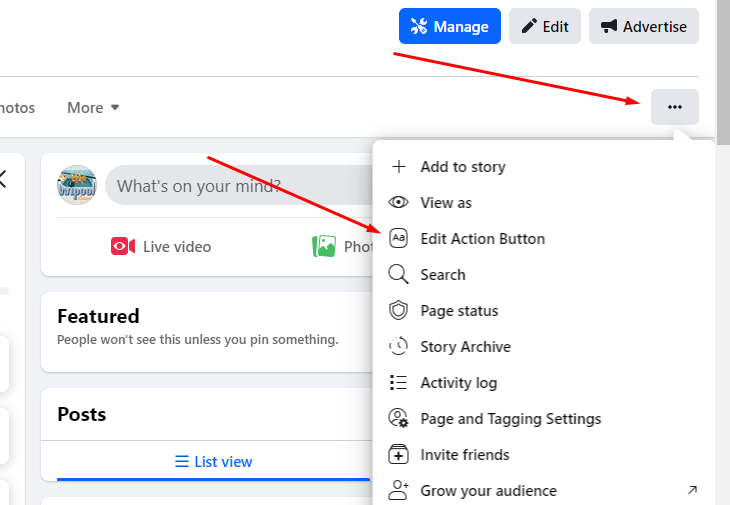
Ive tried everything also contacted the metabsupport but they say is the new page experience that doesn’t have the like button or option. I created a new page just to see and the like button shows up. Also have other pages that I ménage that have the button of Like and are the same category.

optimise Digital
BANNED
- Apr 16, 2024
- 624
- 85
Make sure your Facebook page settings are set up so everyone can see and use the Like button.
Where can i do that ?Make sure your Facebook page settings are set up so everyone can see and use the Like button.


- Mar 2, 2021
- 4,058
- 1,188
You should go to the Facebook settings page, and you should make sure that your Facebook page is public and not a private page, go to your Facebook page, click on "Settings" at the top right, and navigate to "General, make sure the "Visitors can like my Page" option is enabled.

Wendecoder
Junior Member
- May 10, 2024
- 135
- 29
You can go to settings to customize this